Case Study: Bryvium AreaPulse, a WordPress ZIP Code Checker for Service Areas
How I built AreaPulse, a WordPress ZIP code checker that sorts visitors into Qualified, Coming Soon, or Not Available before the form. No geocoding API needed.
Project Snapshot
- Client
- Own Product
- Impact
- Qualify ZIP leads before the form
- Services
- Custom WordPress PluginLead QualificationService Area Routing
- Tech
- WordPressCustom PHPVanilla JSREST APILead Qualification
Most WordPress sites for local service businesses accept a form submission from anyone. An HVAC company that covers a handful of ZIP codes still gets requests from three counties away, and somebody has to write back and say no. Membership groups run into the same thing when the boundary is a neighborhood or a parish instead of a service route.
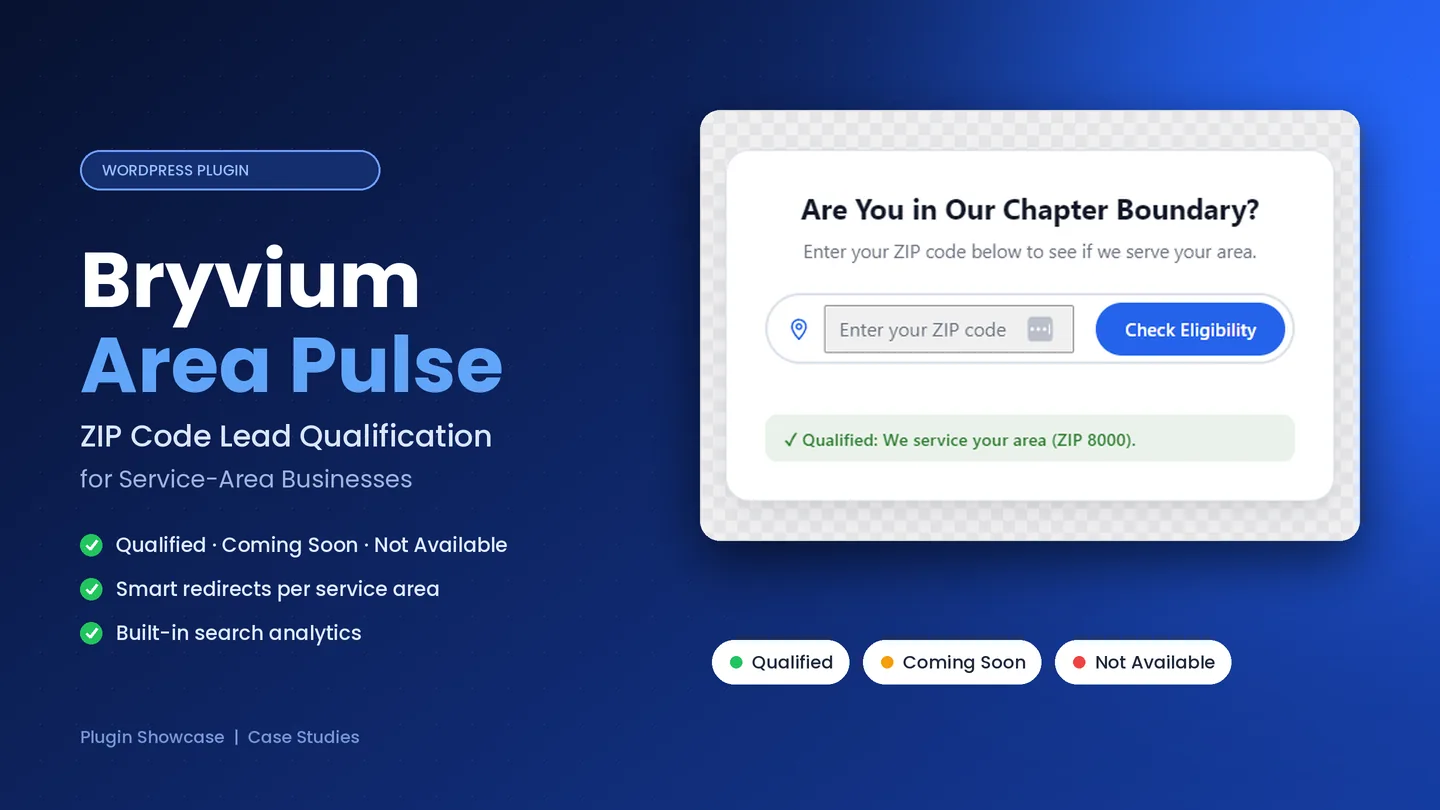
I built Bryvium AreaPulse to handle that on the page itself. It is a WordPress plugin that takes a ZIP code, checks it against a list stored on your own site, and tells the visitor right away whether the area is qualified, coming soon, or not available.
It was originally created under the working name ZIP Code Area Checker, evolved significantly as new use cases and operational requirements emerged during development. As the platform expanded beyond simple ZIP validation and demonstrated broader value for service-area businesses, membership organizations, and location-based workflows, it became clear that the product required a more scalable identity. This led to the transition from ZIP Code Area Checker to AreaPulse.
AreaPulse was designed and developed as a purpose-built WordPress solution focused on service-area qualification, operational efficiency, and long-term maintainability. The administration workflows, ZIP validation system, and routing capabilities were intentionally designed around real-world business requirements rather than feature completeness alone.
The plugin has been tested and is working for a client whose identity I am keeping private. I have kept its feature set focused on what is needed rather than adding features without demand, and I sell it directly under the Bryvium name, the brand I am building for my software products.
1. The Core Operational Challenge
A contact form is a poor place to find out where someone lives. These are the four problems I designed AreaPulse around.
- Leads the business cannot serve. Roofers, plumbers, pest control crews and landscapers collect names from ZIP codes they have never billed. Dispatch still spends time on the callback.
- No way to say "not yet." A plain "we don't service your area" message wastes the visitors in places the business plans to enter. Those ZIP codes need their own bucket and a waitlist page, separate from the areas that will never be covered.
- Eligibility that depends on geography. HOAs, civic associations, alumni chapters and youth leagues often accept members only from a mapped set of ZIP codes. Checking addresses by hand after the application arrives is slow and awkward for everyone.
- Dependence on a ZIP or maps API. Many checkers call a third-party service on every lookup. That means usage limits, extra scripts, a privacy question about sending visitor input elsewhere, and a widget that breaks when the vendor has an outage.
AreaPulse keeps the coverage list on the WordPress site, so none of these dependencies exist.
2. Engineering the Qualification Engine
I treated this as a full admin product instead of a shortcode with a text box.
A local ZIP store instead of a maps API
ZIP codes and Service Area Groups live in a single zipcodes.json file inside /wp-content/uploads/. The server reads that file and matches against it on every check, so there is no per-lookup cost, no API key and no rate limit. The file path is resolved and verified to stay inside the uploads directory, and the file has a size cap. If the file is missing or corrupted, the plugin returns an explicit error. It never falls back to treating every ZIP as qualified, because a silent fallback like that would send the wrong people to your booking page.
Three statuses, each with its own message and redirect
A boolean could not describe the coverage maps I had in mind, so every Service Area Group carries its own status:
- Qualified: send the visitor on to booking, a quote form or a join application.
- Coming Soon: show an expansion message and route to a waitlist page.
- Not Available: decline politely, or point to a partner, another branch or a coverage page.
Each group can have its own result message and redirect. The Global Default Redirect Rules apply to everything else, including the ungrouped ZIP codes on the Quick List. When a group defines its own redirect, the group wins, and every redirect supports a delay timer so the visitor can read the result first.
A front end that stays out of the way
The widget is written in Vanilla JS with no jQuery and no framework runtime. The full ZIP list loads once per page view and stays in memory, which is why autocomplete suggestions appear as the visitor types without a network request per keystroke. The final check goes through a namespaced zcc/v1 REST route protected by a WordPress nonce, so there is no page reload and no admin-ajax call. The suggestion dropdown works with the keyboard.
The shortcode drops in anywhere WordPress renders shortcodes:
[zip_code_checker]
For headers and hero sections there is a compact, field-only layout:
[zip_code_checker mode="compact" cta_url="/schedule-a-quote" button_text="Check Now"]
A sitewide Compact Mode switch on the Styling tab turns every plain [zip_code_checker] into the compact bar. Individual placements can still force mode="full" or mode="compact".
An admin built for people who maintain coverage lists
Everything sits under Settings → Zip Code Checker across four tabs:
- Manage ZIP Codes: a Quick List chip editor with search, filtering and pagination, plus named Service Area Groups. An unsaved-changes indicator warns before you leave the page.
- CSV Import and Export: a single-column list or a two-column
zip,groupfile, with Merge or Overwrite on import. Exports are protected against spreadsheet formula injection. - Styling: four presets (Pill, Modern Card, Minimalist Line, Glassmorphism), an independent Dark Mode, and controls for typography, colors and layout. Everything compiles into
--zcc-*CSS variables on the widget, so the shared stylesheet never changes and stays cacheable. A sticky live preview follows you down the page while you adjust settings. - Analytics: a dedicated
zcc_search_logstable records the ZIP, the resulting status, the matched group name and a timestamp. It stores no IP address and sets no cookie. You get totals per status, a Top 10 of searched ZIP codes, recent activity, CSV export, a confirm-protected reset and an on/off switch for logging.
I tested the plugin with Gutenberg, Elementor, Divi, Bricks and Oxygen. A defensive inline-script fallback keeps its configuration available in builders that change how scripts are enqueued, and it works in Beaver Builder, WPBakery and classic templates through a Shortcode or HTML module.
3. Who AreaPulse Is For
Home services and local operations
HVAC, roofing, plumbing, electrical, landscaping, pest control, cleaning, delivery, internet providers and caterers. Anyone who should not accept a request until the ZIP code sits inside the footprint.
Multi-location businesses
Service Area Groups can stand in for branches. A qualified ZIP sends the visitor to that branch's booking page, a Coming Soon ZIP lands on a waitlist, and a Not Available ZIP goes to the nearest alternative.
Associations and membership sites
HOAs, neighborhood associations, parish groups, alumni chapters and youth leagues can place the checker above a join form or volunteer signup, so only applicants inside the boundary get that far. It works as an eligibility gate in front of whatever membership or form plugin the site already uses. I wrote a separate article on why this check belongs before the contact form.
4. How It Is Licensed and Shipped
AreaPulse is sold directly and is not listed on the WordPress.org plugin directory. Each purchase is prepared for the buyer's website: a single domain, a production plus staging pair, or a wildcard that covers a domain and its subdomains. The www and non-www versions of a domain count as the same site.
A license includes the plugin package, updates and support for the plan period, and it covers one website. Moving to a new domain or adding another site means I issue a new license. Feature requests that go beyond the current product are handled as custom development. Because I built the plugin, support questions come straight to me.
5. Outcomes the Architecture Is Built For
AreaPulse is a new release, so I am not publishing customer numbers I do not have. These are the outcomes the design targets:
Lead quality: requests from outside the area stop at the checker and never reach the CRM, calendar or inbox.
Expansion demand: Coming Soon ZIP codes stay visible and lead to a waitlist, so interest in new territory is not lost.
Membership screening: a community site can require a qualifying ZIP before someone starts an application.
Running cost: no geocoding vendor, no per-lookup bill and no visitor IP in the analytics log.
Editor independence: staff can manage a few dozen ZIP codes or tens of thousands from wp-admin, including CSV round trips, without touching PHP.
I am keeping the plugin focused for now. Email capture for the waitlist, form plugin integrations and a native Elementor widget are on my list, and which of them comes first will depend on what customers ask for.
Product Evolution & Ongoing Development
AreaPulse has moved beyond the build stage and into real-world use. It is running on a client's WordPress site, and that deployment has shaped the product more than any planning document could. Watching how an administrator actually maintains a service-area list day to day surfaced operational requirements that were not visible before launch, and those requirements now guide what gets built next.
From one-by-one entry to bulk ZIP code management
The first version of the ZIP management workflow required administrators to add each ZIP code individually. That approach is clear and safe for a short list, but it becomes a bottleneck when a business covers dozens of ZIP codes across several counties or opens a new territory all at once. Every additional entry meant another round of typing, confirming and repeating.
Live use made that friction obvious, so the workflow now supports bulk ZIP code entry using comma-separated values. An administrator can paste an entire list of ZIP codes in one step instead of entering them singly. For businesses with large service areas, this removes a repetitive task from routine ZIP code management, reduces the chance of data-entry mistakes, and shortens the time between deciding to cover an area and having the checker reflect it. The result is a meaningful gain in administrative efficiency, and it makes everyday service-area management practical for teams that do not want to maintain coverage through CSV files alone.
Domain locking for commercial licensing
AreaPulse is licensed per website, so the product needs a dependable way to tie a license to the domain it was prepared for. A domain-locking system is currently in development to support future commercial licensing at a larger scale. It is designed to work with the existing licensing model, covering single domains, production and staging pairs, and wildcard plans, while keeping license handling straightforward for buyers.
This feature is still in active development and has not been merged into the production codebase. It is maintained, together with other roadmap and experimental work, in a private repository. Keeping unreleased work separate from the shipping plugin means the version in client use stays stable while new capabilities are built and verified on their own schedule.
Scalability and long-term maintainability
Each change to the product is evaluated against three questions: does it solve a real operational problem, can it be maintained without adding fragility, and will it still hold up as coverage lists and installations grow? The local zipcodes.json data model, the namespaced REST route and the CSS-variable styling system were chosen with that discipline in mind. The long-term goal is a focused WordPress plugin that handles ZIP code management, service-area management, lead qualification and membership qualification reliably at any size, with an administration experience that stays fast and predictable as the product grows.
Upcoming Development Priorities
The roadmap below reflects what real deployments have shown to be most valuable. Priorities will be adjusted as customer demand becomes clearer, in line with the focused approach described above.
- Bulk ZIP management enhancements: extend the comma-separated entry workflow with clearer validation feedback, duplicate detection and bulk removal, so large coverage lists can be edited as quickly as they can be created.
- Domain licensing infrastructure: complete and release the domain-locking system so licenses for single sites, staging pairs and wildcard plans can be managed consistently as the commercial customer base grows.
- Expanded administration tools: deepen the wp-admin experience with better organization for large Service Area Groups, faster search and filtering, and more useful reporting on how visitors move through each status.
- Service-area management improvements: make it easier to plan territory changes, including moving ZIP codes between Qualified, Coming Soon and Not Available groups in bulk when a business expands or pulls back.
- Workflow automation enhancements: reduce manual follow-up by connecting qualification results to the tools businesses already use, including waitlist email capture and form plugin integrations.
- Long-term scalability and maintainability: keep refining performance, test coverage and code structure so the plugin remains reliable on sites with tens of thousands of ZIP codes and stays straightforward to support and update.
Technical Stack Summary
- CMS: WordPress 7.0+ (PHP 8.4+ recommended)
- Plugin: Bryvium AreaPulse 1.0.0, designed and developed by Bryan Granse
- Front end: Vanilla JS autocomplete, nonce-secured
zcc/v1REST checks, CSS custom properties for theming - Data:
zipcodes.jsonin uploads, plus an indexedzcc_search_logstable for analytics - Builders: Gutenberg, Elementor, Divi, Bricks, Oxygen, and any theme that supports shortcodes
- Distribution: direct per-site license with annual support and updates, not WordPress.org
Related reading: why a ZIP check belongs before your contact form and how Qualified, Coming Soon and Not Available routing works.
Need AreaPulse on your WordPress site?
I prepare each copy for your domain and support it myself.
- Schedule a Direct 30-Minute Discovery Call: Book via Calendly
- Get in Touch Directly: Visit the Contact Section
Work With Me
Want Results Like This for Your Organization?
Tell me about your platform and I'll outline the fastest path to a website that loads quickly, ranks well and turns visitors into inquiries.
Related Reading
WordPress Service Area Routing: Qualified, Coming Soon and Not Available
A yes or no ZIP check hides your real coverage. Set up Qualified, Coming Soon and Not Available groups with their own messages and redirects in AreaPulse.
How to Qualify Leads by ZIP Code Before a WordPress Contact Form
Stop collecting form entries from outside your area. Why a ZIP code check belongs before your WordPress contact form, and how AreaPulse does it without a maps API.
Case Study: Modernizing Battle Hill Association's Web Platform & Search Visibility
How a complete architectural rebuild using Oxygen 6, custom PHP/JS event logic, and technical SEO turned an invisible, cluttered site into a top-ranking, high-converting digital platform.