How to Qualify Leads by ZIP Code Before a WordPress Contact Form
Stop collecting form entries from outside your area. Why a ZIP code check belongs before your WordPress contact form, and how AreaPulse does it without a maps API.
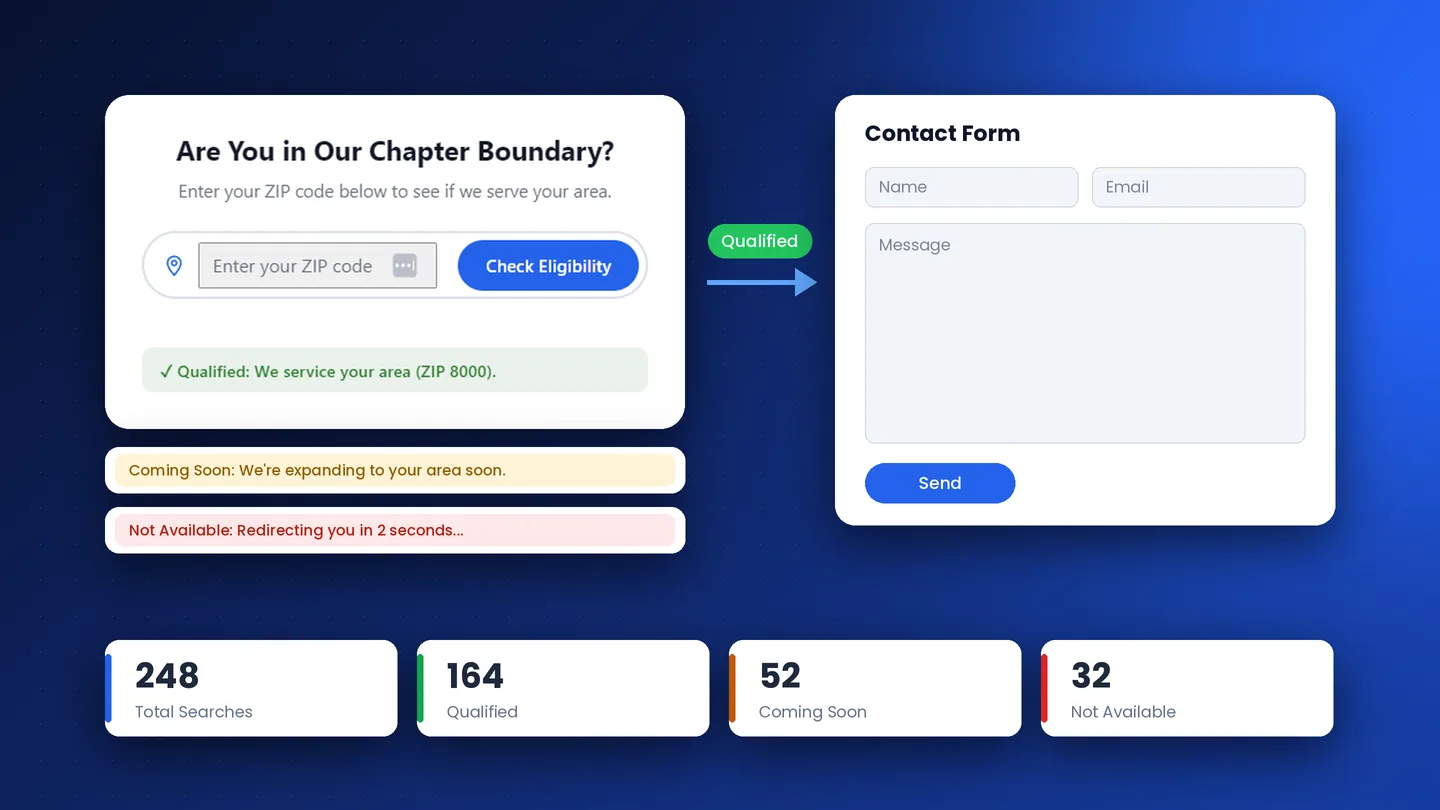
Picture a roofing company with a contact form on its homepage. Someone fills it in, the notification email lands, the CRM creates a contact, and a calendar link goes out. Then a person on the team looks at the ZIP code and realizes it is two counties past the last job they ever took.
The same thing happens to a neighborhood association whose join form is open to everyone. Applications arrive from the next town over, and a volunteer has to write back to each one.
Nothing is wrong with the form in either case. The problem is the order of the steps. I built Bryvium AreaPulse, a WordPress plugin, so the location is checked first and the form only appears for people who can actually use it.
1. What an Open Form Costs a Service Business
Home service sites are usually tuned for more form submissions, and association sites for more join clicks. Both numbers hide the same waste:
- A roofer declines jobs in ZIP codes that were never on the route.
- An HVAC dispatcher explains that the neighboring parish is not covered, after the lead has already been logged and followed up.
- A civic group sends "you are outside our membership area" to someone who just finished a long application.
Each of those replies is staff time, and each one also leaves the visitor with a worse impression than a clear answer on the page would have. Asking for the ZIP code first and the rest of the details second is a small change to the funnel that removes a lot of that back and forth.
2. Membership and Community Sites Have the Same Rule
ZIP qualification is not only a contractor feature. Plenty of organizations state their boundary in the bylaws: you can join, volunteer or request directory access only if you live in certain ZIP codes. HOAs, parish groups, alumni chapters and youth leagues are the usual examples.
On a WordPress membership or community site, AreaPulse sits above the join form, the volunteer signup or the access request page. Applicants whose ZIP code is on the list move on to the form. Applicants from a new subdivision the board has not approved yet can be sent to a waitlist page, and everyone else sees a clear message saying why they cannot apply.
AreaPulse does not replace your form or membership plugin. It is the check that runs before them, so staff stop sorting through applications that were never eligible. If you want to see how the three result types are configured, I wrote that up in how Qualified, Coming Soon and Not Available routing works.
3. Why I Did Not Build It on a Maps API
Many "enter your ZIP code" widgets query Google or a paid ZIP database every time someone types. When I planned AreaPulse I ruled that approach out for four reasons.
- The bill follows the traffic. Bots and casual visitors use lookups too, and each one costs money.
- The checker depends on someone else's uptime. A quote page should not stop working because a vendor hit its quota.
- Visitor input leaves your site. You do not need to send a ZIP code to a third party to find out whether you cover it.
- Extra scripts cause trouble in page builders. Third-party widgets tend to fight with Elementor, Bricks and Oxygen layouts.
AreaPulse keeps the coverage list in a zipcodes.json file on your own site and matches against it on the server. The browser talks to WordPress through a nonce-protected zcc/v1 REST route, and the autocomplete list is fetched once per page view and kept in memory. The search log records the ZIP code, the result, the group name and a timestamp. It never records an IP address.
4. Where the Checker Goes on the Page
The checker belongs before the Calendly embed, the Gravity Forms block or the "request service" button. These are the placements I recommend:
- Service area landing pages: the full card layout at the top of the page.
- Header or navigation bar: compact mode with
[zip_code_checker mode="compact"], so the gate is visible on every page. - Join or membership pages: the first block, above the application form.
- Multi-location sites: one checker with a Service Area Group for each branch, each pointing to its own booking page.
Editors manage the list under Settings → Zip Code Checker. They add ZIP codes as chips, organize them into groups, import a CSV with zip,group columns, and set redirects with delay timers. The full feature list and the engineering behind it are in the AreaPulse case study.
5. What Changes When Geography Comes First
A contractor stops following up on leads they will never serve. A membership chair stops writing rejection emails. Visitors from areas you plan to enter get routed to a waitlist instead of a flat no, and the log shows which ZIP codes people search for, including the ones you do not cover yet.
I built and maintain AreaPulse myself, and each license is prepared for the buyer's domain. If your WordPress site accepts form entries from anywhere, a ZIP check in front of it is a small change with an immediate effect.
Put a ZIP gate in front of your form
- Schedule a Direct 30-Minute Discovery Call: Book via Calendly
- Get in Touch Directly: Visit the Contact Section
- See how it is built: Bryvium AreaPulse case study
Work With Me
Ready for a Faster, Lead-Generating Website?
I design and build custom Next.js and WordPress websites for builders, HVAC companies, contractors and growing businesses. Answer a few questions and book a discovery call to talk through your project.
Related Reading
Case Study: Bryvium AreaPulse, a WordPress ZIP Code Checker for Service Areas
How I built AreaPulse, a WordPress ZIP code checker that sorts visitors into Qualified, Coming Soon, or Not Available before the form. No geocoding API needed.
WordPress Service Area Routing: Qualified, Coming Soon and Not Available
A yes or no ZIP check hides your real coverage. Set up Qualified, Coming Soon and Not Available groups with their own messages and redirects in AreaPulse.
Case Study: Modernizing Battle Hill Association's Web Platform & Search Visibility
How a complete architectural rebuild using Oxygen 6, custom PHP/JS event logic, and technical SEO turned an invisible, cluttered site into a top-ranking, high-converting digital platform.